
If you’ve spent any time working on affiliate marketing or blogging, you know how tough content creation can get. That’s where Wealthy Affiliate’s Site Content tool steps up your game. Built right into the Wealthy Affiliate platform, it’s designed to help bloggers, entrepreneurs, and digital marketers keep their content on track and scaling without the hassle.
Here’s my honest breakdown and rating for Site Content, followed by a super detailed look at everything this tool offers. If you’re curious about what it can do for your writing workflow, stick around for the full scoop.
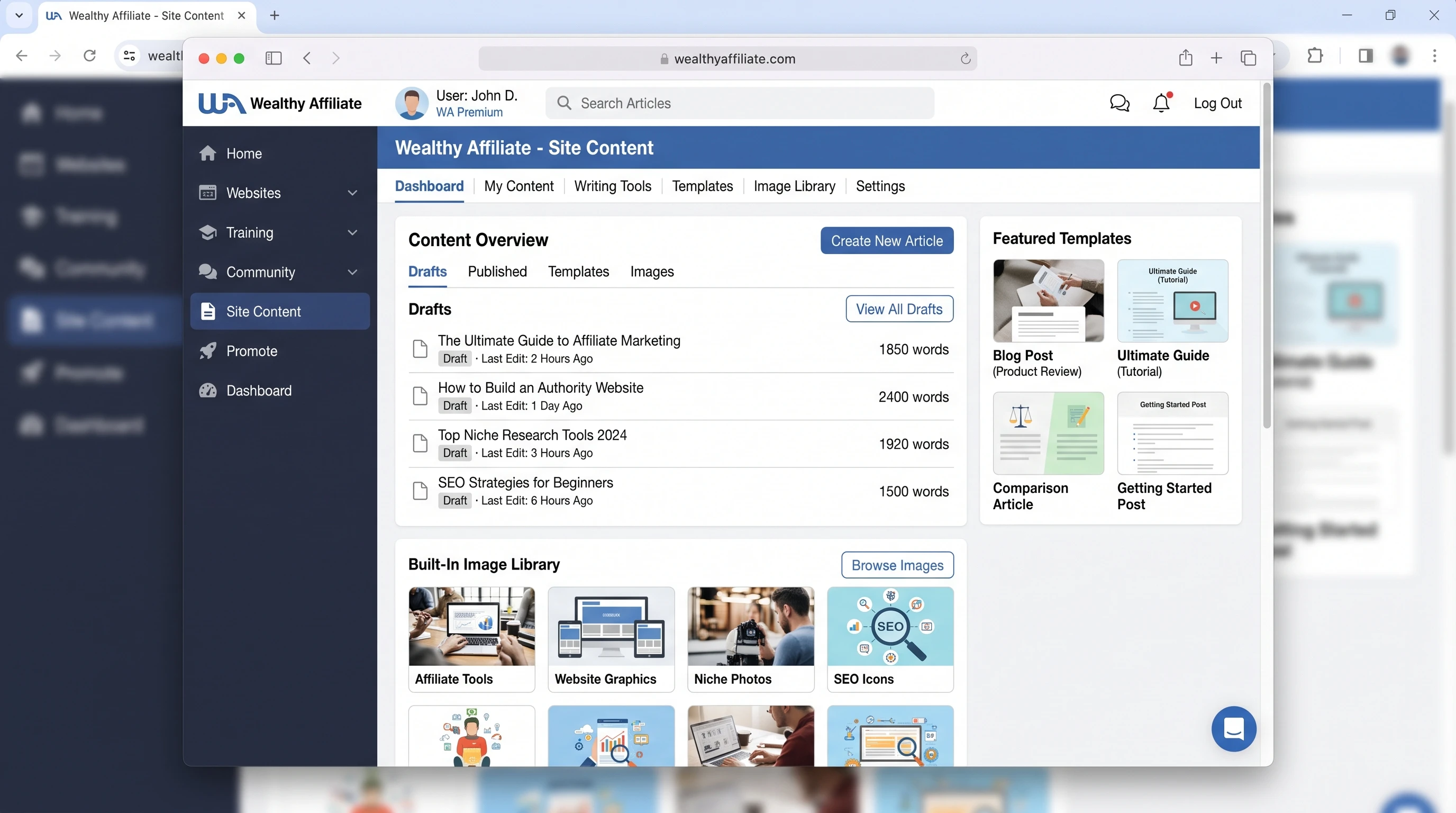
Tool Name: Site Content (by Wealthy Affiliate)
Website: WealthyAffiliate.com
Access: Included in Premium membership and higher
Pricing: Starts at $49/month (Wealthy Affiliate Premium)
Best For: Bloggers, affiliate marketers, content creators
Key Features: Distraction-free writing, built-in grammar and spelling check, direct publishing to WordPress, image library, plagiarism checker, template library
Customer Support: 24/7 via WA support & community
Overall Rating: 4.6/5
Free Trial: Yes (with Wealthy Affiliate Starter membership)
There are a lot of content creation tools on the market. But if you use WordPress and want a built-in workflow tied to your affiliate and blogging strategy, the Wealthy Affiliate site content might be the writing hub you didn’t know you needed. It sets itself apart by plugging directly into Wealthy Affiliate’s all-in-one system, which includes hosting, keyword research, and training.
Overview: What Is the Site Content Tool?
I’ve used dozens of different writing apps, from basic Google Docs to feature-packed platforms like Grammarly and Jasper. Site content isn’t about having shiny distractions or endless features you forget about after the first week. Its core goal is simple: make it as easy as possible for you to write, polish, and publish blog posts that get results.
Site content is hosted within the Wealthy Affiliate dashboard. If you’re already a member, you can access it from your main menu. It’s not a standalone app you buy separately; it’s included as part of WA’s Premium and Premium Plus+ memberships. This setup gives you direct connections to your sites, keyword tools, and asset libraries, cutting down on those annoying app-switching moments.
You get a clean, distraction-free interface specifically for blogging and article creation. The workflow starts with writing drafts and checking for plagiarism and ends with directly pushing to publish to your WordPress websites. There’s a built-in image bank, grammar/spelling checks, and several content templates to help you with your content.
Founders and Background of Site Content
I joined Wealthy Affiliate in 2017 with no idea about what affiliate marketing is and how it worked. The platform was created by Kyle and Carson back in 2005. Their approach has always been community-driven and super hands-on, so it’s no surprise that Site Content was launched as a solution to the real problem most members faced: struggling to consistently write content that ranks.
Before Site Content, a lot of us bounced between Word, Google Docs, and even Notepad and then copy-pasted to WordPress and hoped for the best. Formatting and image issues happened all the time. Site content was built from direct requests and feedback from the WA community. The founders actually use and rely on this tool themselves to help them with their content creation, because it just feels practical in the day-to-day project routines.
I love and appreciate that if there’s something you need improved or fixed, you can send feedback straight inside the platform, and the WA team actually listens and sends updates regularly. It’s the type of responsiveness you don’t get from big, anonymous software companies.
Site Content Features: What’s Inside?
The Wealthy Affiliate site content packs a lot into what looks like a simple writer. Here’s what you get when you open it up:
- Distraction-Free Editor: Write in a super clean interface, with no menus or popups getting in the way.
- Grammar and Spelling Checks: Realtime suggestions that highlight typos, grammar mistakes, and even some style issues as you write.
- Built-in Plagiarism Checker: Automatic detection using the Copyscape API. You get several free checks per month with Premium, perfect for peace of mind before you publish.
- AutoSave and Document Management: Version history, autosave, file organization, and status tracking make sure you never lose your work.
- Template Library: Access to tons of fill-in-the-blank blog post templates, including product reviews, listicles, tutorial outlines, and more.
- Image Library and Integration: Free stock photos (from WA’s built-in library) and easy upload of your own images, with alt text input for SEO all included.
- Word Count and Goal Setting: Set targets for words or posts, track your progress visually, and get motivated by hitting your content milestones.
- Direct WordPress Publishing: With one click, push your blog posts straight to your connected WordPress websites. Choose the site and publish it as a draft or live, all from inside the site content tool.
- Multiple Website Connections: Manage multiple sites in your WA account and distribute content without juggling a bunch of logins/tabs.
- Content Quality Score: View how your article measures up with suggestions for improvement, covering readability, SEO basics, and essential blog elements.
So, let’s now check out the features I think you’ll really like if you’re serious about content creation.
Writing and Editing in Site Content
The writing window is plain and open, with very few things to distract you. You get live spellcheck and suggestions, so you can fix typos as you go. Formatting options are familiar, like headers, lists, bold, and italics, which is all most bloggers need.
I find the built-in structure to be a nice nudge to stay on task. Unlike Google Docs, where it’s easy to wander off and check emails, here you can actually focus. If you need references or notes, you can split your browser/tabs, but everything else stays out of view.
Using Templates for Faster Content
Templates have helped me more times than I can count. If I’m stuck starting an affiliate review, the template lays out suggested headings and standard review elements (like Pros, Cons, Features, Verdict, and so on). This cuts the time from a blank page to a finished draft by days, which is especially helpful if you’re running multiple sites or batch creating posts.
Image Library & Optimization
Images often slow down content creation, as you have to find free-use stock, resize, and add alt text. Wealthy Affiliate Site Content puts a fresh image library right at your fingertips. You search by keyword, drop them in, and set alt text all from the writing window. This is a sweet shortcut for keeping your content visually engaging and meeting SEO guidelines.
Plagiarism Checker That Just Works
I’ve tested a bunch of plagiarism checkers, from Copyscape to Grammarly’s premium version. The one built into Site Content uses Copyscape under the hood. Each Premium member gets a monthly allowance of scans, plenty for regular blogging. This is super important if you hire writers, use AI content, or want to make sure your posts aren’t too similar to existing web content.
If it finds something, you get a simple, clear report. You can make edits right there before sending the post to your site. This level of integrated quality control saves time and protects your hard work from future headaches.
Goal Tracking and Productivity Tools
If you work to a word count or number of articles per week, Site Content’s built-in tracker is pretty handy. You can set a goal (like 10,000 words this month) and see your progress at a glance. Every time you publish content or hit milestones, you’ll get a little boost of motivation. It helps keep you accountable without the need for third-party goal apps or spreadsheets.
OneClick WordPress Publishing
One of my favorite features is direct publishing to WordPress. Once you finish your article and clear it for plagiarism, you pick your connected site, add categories/tags, and publish as a draft or live post, all in one click. There’s no fumbling with formatting errors or copypaste mishaps. Even your images, headings, and links stay clean.
This syncs really well for people managing several affiliate sites from one Wealthy Affiliate account. It’s a timesaver and prevents a lot of little mistakes that hurt SEO or site layout.
Why Use Site Content Instead of Google Docs or Word?
I used to rely mostly on Google Docs because it’s free, easy to share, and works everywhere. But once I had a few blogs going, my workflow started feeling clunky. Here’s how Site Content helps solve a bunch of the issues I kept running into:
- AllinOne Workflow: Start writing, check grammar, add images, scan for plagiarism, and publish to your site, all without leaving the platform.
- Auto Formatting: No more weird paragraph breaks or missing images when copying into WordPress; Site Content keeps it clean.
- Organized Content Management: You can see every article you’ve written, its publish status, and even filter by website or category. If you run multiple sites, this is super useful.
- Focus on SEO Essentials: With reminders to add alt text, meta descriptions, and headings, it bakes in good SEO habits, even if you aren’t an expert.
- Easy Productivity Tracking: See how much you’ve written, monthly or all time, across all your sites. Way easier than digging through Google Drive folders or running separate reports.
For solo bloggers or affiliate site owners, skipping a bunch of moving parts saves real time. You don’t have to keep everything in your head or depend on a dozen apps and browser tabs just to get one post published.
Training and Support for Site Content
If you’re not a tech whiz or are new to content management, the transition into site content is pretty smooth. There are step-by-step video tutorial walkthroughs inside Wealthy Affiliate’s “Live Classes” section, plus a searchable help knowledge base. I picked it up in about 10 minutes, but if you run into hiccups, the WA support and community answer your questions reasonably fast.
Inside the Wealthy Affiliate platform, members often share tips and workflow hacks for site content, which adds to the ongoing education vibe. The basic training covers setup and best practices for content writing, SEO, and publishing. If you’re stuck, you can reach out via chat or ticket and usually get practical answers the same day. That is another thing I love about using tools inside a community-focused platform.
Content Quality Tools and SEO Readiness
Polished content ranks better and keeps readers around longer. Site Content emphasizes a few content quality basics:
- Readability Checker: Recommendations to keep your writing simple and clear, with readability scores and sentence structure tips.
- Element Checklists: Reminders to add effective titles, links, images, meta descriptions, and the right headings.
- Built-in SEO Checklist: Inline suggestions for basic on-page SEO, like keyword placement, alt text, and use of headings throughout the article.
- Duplicate Content Flags: Alerts if your article’s similarity to other web content is too high, helping you catch and fix issues before publishing.
The goal isn’t to overwhelm you with details. Instead, you get practical, actionable nudges to improve before you hit publish, so you don’t have to backtrack later. You don’t need to remember a 20-point checklist every time you publish. Site content prompts you at just the right time.
How Does Site Content Stack Up For Affiliate Marketing?
For anyone running an affiliate site, being able to produce quality, unique posts is really important. Wealthy Affiliate designed site content with this reality in mind. Here are a few specific reasons I think affiliate bloggers will appreciate this tool:
- Review Templates: Prebuilt formats for product reviews, comparisons, “best of” lists, and more. These are the bread and butter of most affiliate sites.
- Easy Brand Consistency: Use and customize templates to keep your reviews and articles consistent in tone, headings, and structure.
- Fast Image Integration: Insert product images, charts, and stock photos with alt text in seconds. Great for “top 10” posts and how-tos.
- Plagiarism Protection: Keeps your content unique, which means better search rankings and less risk of affiliate application rejections.
- Seamless Blog Management: Push to multiple websites with just a couple of clicks. Manage your whole affiliate site network inside one dashboard.
Site Content hits that sweet spot where most affiliate marketers need help: keeping up with regular posts, making sure nothing falls through the cracks of your content creation, and sticking to proven content formats that actually earn commissions.
Examples: A Week with Site Content in Action
I’ll break down how I use site content in a typical week of affiliate blogging. This example covers managing two affiliate websites at once and outsourcing a small batch of reviews to a freelancer.
Starting a New Review
First step: Open up the “Product Review” template. Plug in the product name, use the suggested headings for Features, Pros & Cons, User Experience, and Final Verdict, and then fill out each section as you go. Throughout, I can drop in comparison tables via simple markdown or bullets.
As I’m writing, Site Content flags any awkward grammar or typos. Toss in a few product images straight from the image library (searching “Bluetooth headphones” in this case), add alt text, and drag them into place. Use the built-in research tab to reference competitor reviews, making sure not to step on existing content.
Publishing and Delegating
Once finished, run the plagiarism checker. No major overlap comes up, so hit publish and select my “Tech Reviews” affiliate site. Five minutes later, your article is live as a draft in WordPress, including all the formatting and images.
For the project I outsourced, I simply copy my content template, assign it to my VA or hired writer, and then review their draft inside Site Content. Be sure to check the quality, run the plagiarism scan, and either request edits or publish directly to your second blog. Having it all in one place makes reviewing and delegating easy, even while juggling your writing workload.
MonthEnd Productivity Review
At the end of the month, check your word count goals and overall publishing record inside Site Content’s dashboard. If you are behind, adjust your weekly targets or schedule a content blitz. If you are ahead, use the extra time to update or improve older posts (the document library keeps everything organized for easy updates later).
Site Content vs. Other Writing and Publishing Tools
I’ve compared site content side by side with some popular alternatives like
- Google Docs (free, accessible everywhere, but no direct publishing, built-in plagiarism, or SEO tools)
- Grammarly (top grammar and spelling, limited publishing, paid plagiarism)
- WordPress block editor (native for WP, but limited productivity tools and no draft organization)
- Surfer SEO (SEO-driven drafts, pricey, less focus on publishing workflow)
- Jasper.ai (AI writing, strong templates, monthly fee, plagiarism is extra)
What stands out with Site Content is the frictionless handoff from draft to published post and all those “blog basics” (templates, plagiarism checking, and image library) included for the single WA membership price. You save on juggling subscriptions and get better integration.
Membership Plans and Access
Wondering about pricing? Site content comes bundled with Wealthy Affiliate memberships. Here’s how it works:
- Starter: Free to try, but limited to a few articles, minimal plagiarism checks, and one website connection. Good for getting your feet wet with site content.
- Premium ($49/month): Full Site Content tool, hundreds of templates, up to 10 connected WordPress sites, a monthly plagiarism allowance, a full image library, and unlimited document management.
- Premium Plus+ ($99/month): Everything in Premium, plus higher usage limits. Great if you manage large teams, several brands, or want enterprise-level hosting, faster plagiarism scans, and more templates.
If you’re just starting out or wanting to test the writing tool, the free Starter plan is worth checking out. You get a feel for the environment, see how site content fits into your workflow, and can upgrade if it makes sense for your business.
Community Feedback and My Experience
The best thing about Wealthy Affiliate is the active community. I’ve posted workflow tips and asked for help inside WA dozens of times, and there’s always someone willing to share a shortcut or template they use. The Site Content forum is especially helpful for new bloggers who want real, noncorporate advice on writing, publishing, and scaling up.
Personally, I’ve seen my content output go up by about 30% when sticking to site content instead of bouncing between apps. My publishing routine got more efficient, I’ve run into fewer issues with duplicate content, and organizing older drafts for updates became way simpler. My only issue is that, right now, advanced SEO features (like content scoring by keyword density or SERP comparison) are lighter than tools like Surfer, but for everyday blogging and affiliate writing, Site Content covers 95% of my needs.
If you’re curious about long-term results, many Wealthy Affiliate users, including myself, have consistently published more and reported better ranking outcomes by committing to site content as their main writing tool. The platform continues to evolve through community suggestions, so usability and workflow improvements happen regularly.
Limitations to Consider
No tool is perfect for everyone, so here’s where I think site content could do better:
- Limited advanced SEO features; for power users who want deep data, pairing with Ahrefs or Semrush is still helpful.
- Plagiarism allowance is capped; heavy commercial writers might need to buy more scans.
- No AI writing built in; you’ll need your own process if you want automatic content suggestions or rewrites. This might actually be a plus for authenticity and ranking in the long run.
- Formatting quirks: Occasionally images or tables need a tweak after publishing, but this happens less than with Google Docs to WP pastes.
- No nonWordPress export; if you’re on Squarespace, Wix, or a static site, you can’t publish directly.
If you mostly blog and manage affiliate sites on WordPress, these small tradeoffs don’t tend to outweigh the big benefits. But they’re worth keeping in mind as you consider your workflow.
My Honest Verdict: Who Should Use Site Content?
If you’re a blogger, affiliate marketer, or solo entrepreneur who wants to post efficiently, keep your content unique, and manage everything in one place, Site Content nails those essentials. It fits best for
- People using Wealthy Affiliate for site hosting and training (it feels like a natural extension)
- Anyone managing multiple WordPress blogs
- Writers who want built-in templates for reviews, product roundups, and tutorials
- Solopreneurs outsourcing content to VAs or freelancers and needing plagiarism checks
- Creators who care about basic SEO and easy image management
If you need heavy-duty AI writing, deep keyword analysis, or custom CMS publishing, you might want extra tools. But if you want hassle-free writing, accountability, and a clear link from idea to published blog post, Site Content shines as a practical, everyday tool. For writers who have struggled with scattered drafts and inconsistent publishing, Site Content brings welcome organization and peace of mind.
How to Get Started with Site Content
Jumping in is straightforward. If you already use Wealthy Affiliate, site content is just a click away in your dashboard. For newcomers:
- Sign up for the free Starter plan at the bottom of this article
- Take the walkthrough training for Site Content (inside the platform)
- Start a test article using a template or blank draft
- Connect your WordPress site (or set up a free WA test site)
- Finish your draft, run the plagiarism check, and hit publish
I picked it up on my first day. It’s worth trying if you’re tired of the usual writing and publishing headaches or want to see what an integrated blogging tool can do for your workflow. And remember, if you get stuck, the WA help community responds quickly, so don’t hesitate to ask for a walkthrough or feedback on your first post.
Do you want to check out Wealthy Affiliate and the Site Content platform for yourself? The free trial gives you full access to the writing and publishing dashboard with no credit card needed. Try a few posts, see how it feels, and decide if it matches what you need for your online business and creative workflow.
I’m also happy to chat with or answer questions from anyone interested in this site content article. Just drop a comment below or connect with me inside the WA community (that’s where I’m hanging out most of my blogging days!).